
A Sharper Glimpse
The usual way to show someone what's on your media server is to give them an account. Which also signs you up as their tech support, hands a near-stranger a door into your server, and turns one small question — do you have this movie? — into a login, an app install, and a short lecture on how Plex works.
Glimpse does none of that. You send a link. They see your posters. That's the entire transaction.
If you've been here before, you've met Glimpse — a self-hosted web app that turns your Plex, Jellyfin, or Emby library into a browsable wall of posters. This is that same app, sharpened: a proper home at getglimpse.now, a cleaner phone experience, and the whole thing tightened around the one idea it was always really about — sharing what you have without sharing the thing it lives on.
It's a viewer, not a player. That distinction isn't a shortcoming to apologize for. It's the point.
Why a Viewer and Not a Player?
There's a use case that comes up constantly with home media servers and that the official clients never really try to solve: showing people what you have without giving them access to the server itself.
You don't want to hand out Plex accounts to everyone who's curious about your library. You might just want a fast, low-friction way to check whether a film is already there before you go hunting for it. Glimpse handles both by drawing a hard line between browsing and watching. It shows the posters, the descriptions, the cast, the genres, the trailers. What it will not do is stream a single frame of the actual content.
That restraint buys you something bigger than it looks. Because visitors are looking at Glimpse's own copy of your library — not reaching through to your server — you can put it on your network, share it with family, or expose it through a reverse proxy without a second thought about playback access or auth headaches. Ten people scrolling your library is ten people scrolling Glimpse; your media server never hears from any of them. The link even keeps working when your server is asleep, busy, or offline, because Glimpse isn't asking it anything.
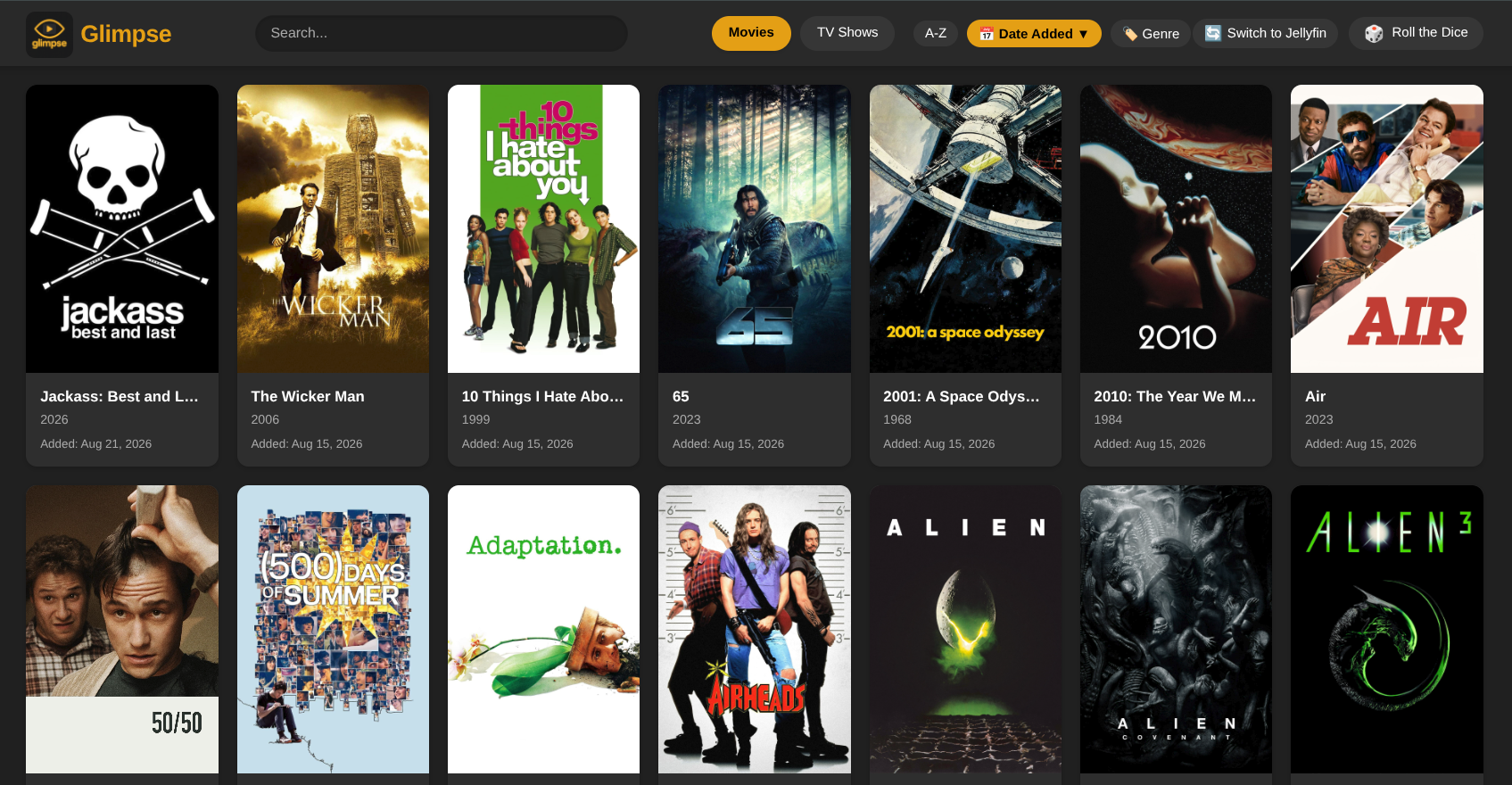
Features That Make a Difference
🖼️ Your whole library, as posters
Movies and TV Shows in one clean grid, using the artwork your server already has. Glimpse keeps its own copy, so the page loads fast every time instead of hammering your server on every visit.
🙈 You decide what they see
Name any library you'd rather keep to yourself and Glimpse leaves it out entirely — it's never even fetched. This isn't a filter someone could slip past; the excluded stuff simply isn't there to find, in a search, behind a genre, or in a random pick.
🔗 Nothing to install, nothing to sign up for
Whoever you send it to just opens the link. No account to make, no app to download, nothing to explain. That's the whole reason it's easy to hand out.
🔍 Find anything, sorted your way
Start typing and the grid narrows as you go. Or filter to a single genre, run it A–Z, or flip to newest-first to see what landed recently.
🎨 Every server, one app
Run Plex, Jellyfin, and Emby side by side if that's your setup. Switch between them with a tap — and Glimpse wears each server's own colors, so you always know which one you're looking at.
📝 The details, without the digging
Open anything to read its description and see the cast and genres. Enough to decide whether tonight is really the night for it, without opening five other tabs.
▶️ Trailers, right where you are
Movies come with a trailer that plays on the page you're already on, so anyone can size something up before committing an entire evening to it.
📱 Built for a phone first
Most people will open your link on a phone, so that's the case Glimpse is tuned for. Menus and details slide up as trays you swipe away, you drag sideways to move between Movies and TV Shows, and it installs to a home screen like a native app.
Roll the Dice
This one gets its own heading because it's the feature people end up loving for no defensible reason.
For the nights when nobody can decide, Roll the Dice picks something at random — one tap, one movie or show pulled from your library, and that's what you're watching. Anyone who's burned twenty minutes scrolling instead of picking already knows exactly why it exists. Sometimes the most useful thing software can do is make the call for you.
How It Works
Three steps, none of them complicated.
- Point it at your server. Give Glimpse your server's address and an access token, then name any libraries you'd rather not show anyone.
- Let it fetch once. Glimpse reads your movies and shows, pulls down the posters and backdrops, and builds its own local copy.
- Send the link. On your own network the address just works. To reach someone outside it, put Glimpse behind the reverse proxy you already run for everything else.
The Link Is the Key
Worth being straight about, because it's the part people gloss over: there's no account and no sign-in standing in front of Glimpse. That's exactly what makes it easy to share — and it also means the link itself is the key. Anyone who has it, or who can reach the address, can browse what you published.
So share deliberately. Set your library exclusions before you hand the link out, and decide how far it should actually reach. If you want a password in front of it, add one at your reverse proxy, the same way you would for anything else you expose. What a visitor can never do is touch your server — Glimpse only ever reads, and the people you share with are looking at a copy, so there's no path by which anyone renames, moves, or deletes a thing.
Who Is Glimpse For?
- Anyone who's ever answered "do you have this?" by listing titles from memory in a text message
- People who want to share their library without handing out accounts to their whole server
- Households running more than one platform who want a single place to see all of it
- Self-hosters who'd rather their tools ran on their own hardware, full stop
Get Started
Glimpse runs as a single self-hosted container that sits next to your media server. No accounts, no third party in the middle, nothing phoning home. You decide who gets the address, and everything it keeps lives in one folder you own.
The full setup — the Compose file, every configuration option, and how to find your Plex, Jellyfin, or Emby token — lives on GitHub. The project site has a tour of everything above if you'd rather see it first, and there's a live demo you can poke at right now.
- Project site: getglimpse.now
- Live demo: glimpse.vitaminsocks.com
- Source & install guide: jeremehancock/Glimpse
Technical Highlights
- Self-hosted — runs in Docker from a single Compose file
- Read-only, always — Glimpse only ever reads from your servers and never writes anything back
- Yours alone — no accounts, no telemetry, nothing leaves your network
- Gentle on your servers — scheduled fetches only pull the artwork that actually changed
- Multi-server — Plex, Jellyfin, and Emby, one at a time or all at once
- Reverse-proxy friendly — sits behind whatever you already run
- Installable PWA — add it to a phone or desktop home screen
- Open source — MIT licensed
Support Development
Glimpse is free, and it's staying that way. If it earns a spot on your home screen and you feel like chipping in, you can throw a few dollars at ongoing development — or, let's be honest, at another hard drive for the server that is definitely not running out of room.
Buy me a coffee →
AI Disclosure
This project was created with the help of AI.
Links
- GitHub: jeremehancock/Glimpse
- Glimpse Website: getglimpse.now
- Live Demo: glimpse.vitaminsocks.com